
Pro feature · Bulk Content Automation
Turn an approved topic list into a controlled WordPress publishing pipeline.
Create multiple AI-assisted articles for one destination, apply the right website profile, add images and internal links, and choose exactly when WordPress should publish them—all from one reviewed plan.
SitePublisher AI Pro · Up to 50 titles per plan · Add Approved to Queue in one step
Inside SitePublisher AI Pro
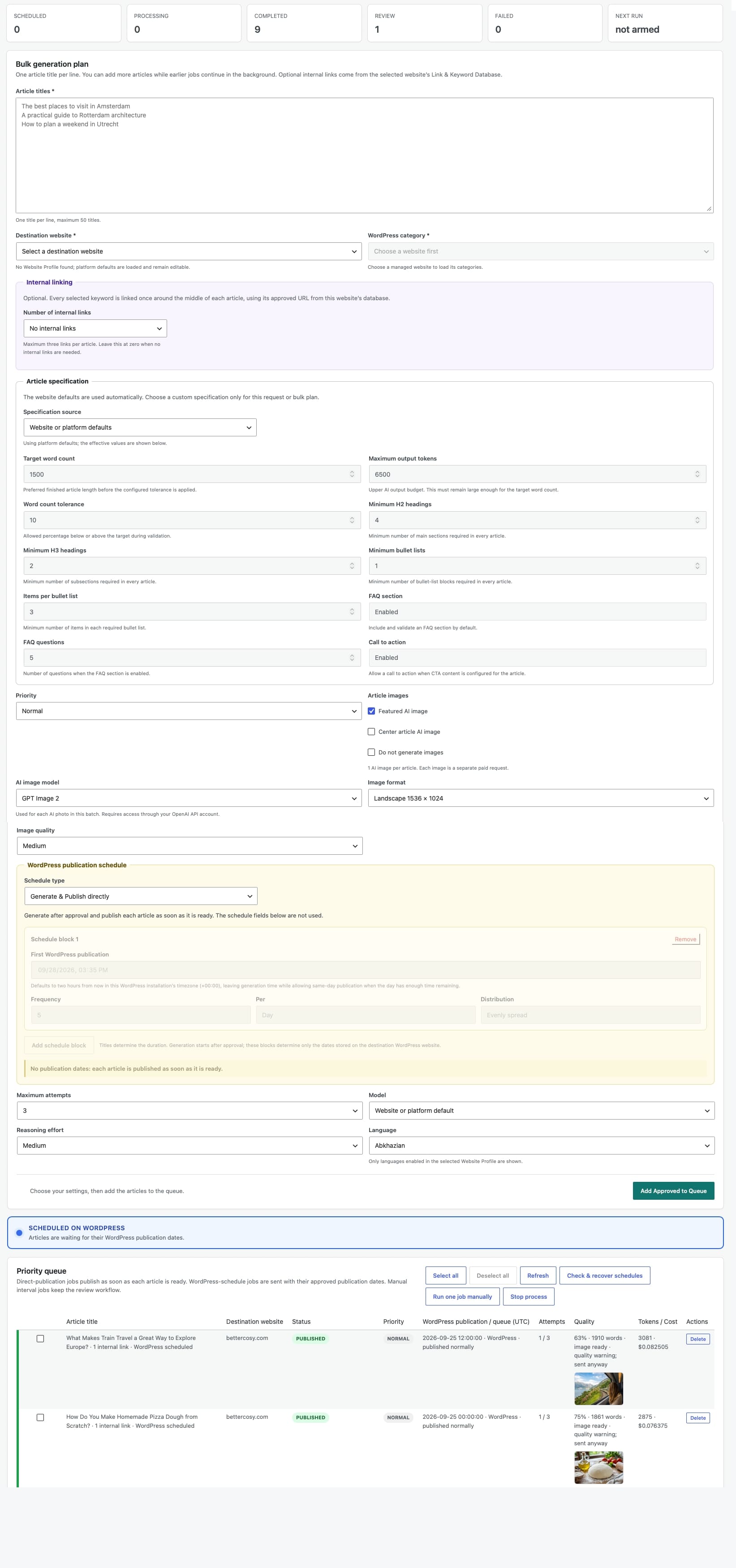
See the complete Bulk Automation workspace
Explore the full screen below. Click the image to open the original and zoom in on any field.
Create at scale
More articles, without more copy-and-paste work
Bulk Content Automation combines planning, generation and WordPress delivery while keeping the important decisions visible. You approve the destination, settings and schedule before the queue begins.
One plan for many articles
Add one approved title per line and turn up to 50 topics into a consistent batch instead of rebuilding the same brief for every article.
Website-specific content
The selected Website Profile supplies the country, language, tone, audience, reading level and author context for the entire plan.
Explore Website Profiles →Images in the same workflow
Generate a featured image, a center article image, both, or neither for each article. Featured AI image is enabled by default. Choose format and quality, or select Do not generate images. Each enabled AI image adds a separate paid request.
Explore AI Image Generation →Relevant internal links
Add up to three approved keyword-and-URL records from the chosen website. Links remain scoped to the correct destination.
Explore Internal Link Automation →Publishing on your terms
Keep results in the queue for review, or approve automatic WordPress scheduling across selected dates and times.
Explore Content Scheduling →Background processing
Once approved, the persistent queue continues processing while you prepare another plan—even for a different website.
A guided workflow
Build the plan once. Review it before it runs.
Shared settings keep the batch efficient. Separate plans keep unlike content safely apart when the destination, category, language, link set or publishing schedule changes.
Choose the destination
Select one connected WordPress website and one of its categories. The saved Website Profile provides the content context for that destination.
Add the approved titles
Paste one topic or article title per line. Add source material or adjust the content specification when this batch needs more direction.
Choose enrichment and timing
Decide whether to generate featured images, include website-specific internal links and use an interval or date-range schedule.
Add Approved to Queue
Review the titles, destination, category and schedule in the form, then click Add Approved to Queue. The plan is validated in the background and the queue becomes visible automatically.
Add Approved to Queue uses the current form values and validates them before enqueueing. Paid text and enabled image requests start after the plan is accepted.
Operational control
Know what every article is doing.
The Priority queue makes bulk creation observable and reversible. You see progress, quality results, attempts, token usage, estimated cost and publication status per job.
Run the right work first
- Low, Normal, High and Urgent priorities
- Multiple batches can remain active
- Prepare a new plan while jobs continue
Pause without losing the plan
- Stop and resume background processing
- Cancel work that is no longer needed
- Retry failed or review-required jobs
Keep publication decisions visible
- Inspect article and image outcomes
- Blue for active work, green for published articles and red for errors
- Publish eligible selections together
- Remove queue records without deleting remote posts
Scheduled Publication Reliability
Automation that checks whether WordPress actually published
Scheduling does not end when a future post reaches WordPress. SitePublisher AI monitors approved publication plans and provides recovery controls when a WordPress schedule is missed.
Safer multi-batch delivery
Jobs targeting the same destination are briefly serialized to reduce lost WordPress cron events when several batches are active.
- One protected destination flow
- Independent batches remain possible
- Approved times stay attached to each job
A watchdog after publication time
After the approved time, the reliability check can confirm the remote status and recover a post that remains incorrectly scheduled.
- Normal and recovered states stay visible
- Manual date or status changes are respected
- Connection failures do not retry forever
Frequently asked questions
Bulk Automation, clearly explained
The full documentation contains the detailed operating steps. These answers cover the main commercial and workflow questions.
Is Bulk Content Automation included in Free?
No. Bulk Automation, remote website management and scheduled publication are Pro features. Free is designed for creating a Single Article on the website where SitePublisher AI is installed.
When do paid AI requests begin?
Clicking Add Approved to Queue validates your settings in the background and adds the accepted plan to the queue. Processing then uses your OpenAI account for text and each enabled AI image. There is no separate preview button.
Can several batches run at the same time?
Yes. Existing jobs continue in the background while you prepare and approve another plan. The queue manages order and isolates every job’s destination and settings.
Do all connected websites need the same language or tone?
No. Every connected website can have its own Website Profile with its own country, enabled languages, tone, audience, reading level and author settings.
What happens if generation needs attention?
The job remains visible with its status and attempt history. You can inspect the result, retry eligible work or cancel it. Publication checks remain separate from generation status.
Where can I find the complete instructions?
Read Running bulk automation for preparation, one-step queueing, scheduling, status colours and recovery guidance.
Ready to scale?
Build a publishing workflow that grows with your content plan.
Choose SitePublisher AI Pro for bulk generation, multiple WordPress websites, controlled scheduling and queue-based publishing from one central workspace.