
Free feature · Single Article Creation
Turn one clear brief into publication-ready WordPress content.
Define the subject, keywords, language, writing style and source notes. SitePublisher AI prepares your article in a private work queue. With Pro, edit the generated text yourself and add an image within the article alongside its featured image before you save or publish.
Included in Free · Current WordPress website · Use your own OpenAI API key
Inside SitePublisher AI Pro
See the complete Single Article workspace
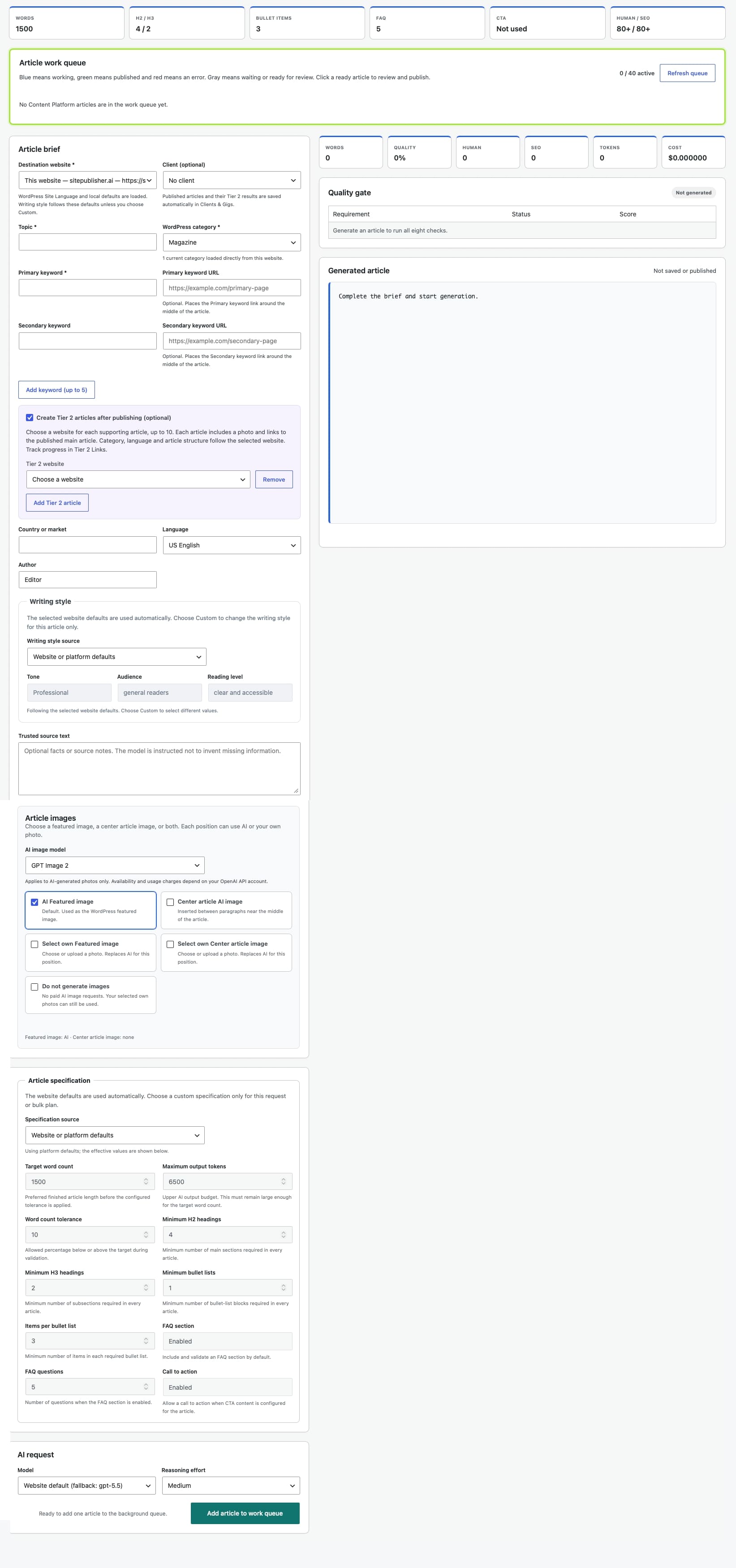
Explore the full screen below. Click the image to open the original and zoom in on any field.
A focused starting point
Give every article the context it needs
A structured brief turns a broad idea into a controlled content assignment. The current WordPress website is selected automatically, so you can concentrate on the article itself.
Topic and category
Enter the article subject and choose the WordPress category in which the finished content belongs.
Keywords with purpose
Add a primary keyword and optional secondary keyword. In Pro, use Add keyword (up to 5) to add more pairs one at a time. Optional URLs create contextual links around the middle of the article.
Language and writing style
Use your Website Profile for a consistent result. Pro shows Tone, Audience and Reading level as dropdowns: keep Website or platform defaults, or choose Custom for this article to enable the controls.
Trusted source notes
Provide facts, references or instructions that the article should respect. Missing information is not treated as permission to invent facts.
Your photo or an AI image
Choose a featured image from the WordPress Media Library or generate one with AI. In Pro Single Article, you can also add a center article image. Choose AI or your own photo independently for each position, or generate no images.
Clear content specifications
Work with defined targets for length, headings, bullet points, FAQ content and quality, so every assignment starts with measurable expectations.
A simple workflow
Create while the work continues in the background
One click adds the brief to your private queue. The form clears for the next idea while SitePublisher AI prepares the current article. Up to 40 Single Article jobs can be waiting or running at the same time.
SitePublisher AI uses the API key you connect. OpenAI API usage is billed separately by OpenAI through your own account.
Confirm the destination
“This website” is selected by default in Free. Pro adds connected remote websites and an optional Client selector beside Destination website. Leave the client empty for your own work.
Complete the article brief
Add the required topic, primary keyword and category, then refine the optional language, audience, source, link and structure settings.
Choose the image method
In Pro, AI Featured image is enabled by default. Add Center article AI image if needed, or select your own photo for either position. Do not generate images switches off AI image requests while keeping your selected photos.
Add it to the work queue
The job starts with normal priority and can be followed from the Single Article screen. The cleared form is immediately ready for another brief.
Open the completed result
In Pro, queue colours match Tier 2 Links: blue for active work, green for published articles and red for errors. Waiting and review states remain clearly labelled.
Start free, scale with Pro
The complete one-article workflow is included in Free
Create and publish on the WordPress website where SitePublisher AI is installed. Pro extends the same controlled process to remote websites and client work.
For your current website
Create one carefully directed article at a time without a SitePublisher AI subscription.
- Current WordPress website selected automatically
- Structured article brief and Website Profile
- AI image or your own Media Library photo
- Private review before draft or publication
For connected websites and clients
Use the same Single Article workspace with the broader tools required for professional multi-site publishing.
- Select a connected remote WordPress destination
- Use separate profiles for different websites
- Assign published work to a client and gig
- Combine single requests with Pro automation
Control at every stage
AI assists the work. You make the publishing decision.
Generated content stays in the private workflow until you open and review it. SitePublisher AI does not turn a Single Article brief into a public post without your explicit action.
Defined input
- Required topic, keyword and category
- Profile-driven language and audience
- Optional trusted source material
Private processing
- Work remains outside the public website
- Text and image progress stay visible
- Failed jobs can be identified and retried
Human approval
- Review the title, article and image
- Confirm destination and category
- Choose draft or immediate publication
Review and publish
Finish the article on your terms
Open a ready queue item to load Generated article. In Pro, edit the text directly, apply bold formatting, and add, change or remove links before saving or publishing. Review the featured image and optional center article image together with your changes. Every AI-generated image is a separate paid OpenAI request. Save the reviewed result as a WordPress draft or publish it; the final URL appears after publication.
Single Article Pro
Prepare client work and supporting articles in one brief.
Choose the optional client before generating. Add up to five keyword and URL pairs, then enable Create Tier 2 articles after publishing and choose a website for each supporting article, up to ten.
Start after publication
Supporting articles start after the main article is successfully published. Each includes an AI featured image and links back to the main URL, using its destination website’s category, language and structure.
Explore Tier 2 Links →Keep the publication history
With a client selected, main and supporting articles appear under that client in Clients & Gigs. Without a client, the normal publishing workflow remains available.
Explore Clients & Gigs →Report the selected results
Export one result or selected rows to a branded PDF, including full article URLs and every supplied keyword and target URL.
Explore Publication Reports →Frequently asked questions
Single Article Creation
Practical answers about access, images, destinations, review and API usage.
Is Single Article Creation included in Free?
Yes. SitePublisher AI Free includes the complete Single Article workflow for the WordPress website where the plugin is installed.
Can I use my own featured photo?
Yes. Select an existing image from the current WordPress Media Library or upload your own instead of generating an AI image.
Does the article publish automatically?
No. A completed Single Article remains in your private review workflow until you explicitly save it as a draft or choose Publish now.
Can I create content for another website?
Remote destination websites are a Pro feature. Free creates and publishes content on the current WordPress installation.
Can I edit the generated result?
Yes. Review the complete content, edit the article title and replace the featured image before choosing a WordPress draft or immediate publication.
Are OpenAI API costs included?
No. You connect your own OpenAI API key, and OpenAI bills API usage separately through your OpenAI account.
Create your next WordPress article with a clear, controlled workflow.
Start free on your current website, or compare Pro when you need remote destinations and client publishing tools.